 Offline

Best free scientific calculator for evaluating math expressions and equations
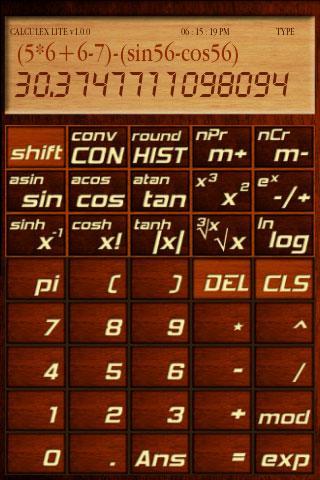
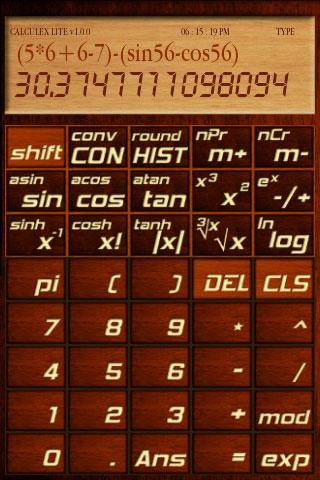
CalculeXLite is a free scientific calculator capable of evaluating mathematical expressions.With a classic wooden theme calculeX gives you the best user experience.Optimized to work with math expressions with numerous math functions.
Following are the features CalculeXLite :
->Dual display capability
->Evaluate mathematical expressions easily
->improved error detection system
->New HIST button showing the Expression-Answer history
->Persistent display memory
->Special DOUBLE_EQUAL_TO option for expression verification
->Lots of inbuilt functions in a free version
->Inbuilt miniature digital clock to keep track of time
->very large input buffer to store numbers with upto 25 digits
->super intelligent parenthesis;No need of explicit multiplications
->Capable of storing expressions longer than 200 digits
->Classic wooden theme
->Follows the PEMDAS rule of evaluation
->Uses most efficient and fast algorithms
->Dual font support for the main display
->Full screen support
->Support for Degree/Radian system
->Wide range of trigonometric functions
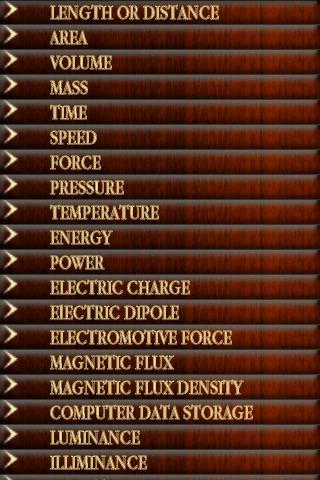
->More than 150 units you can convert to
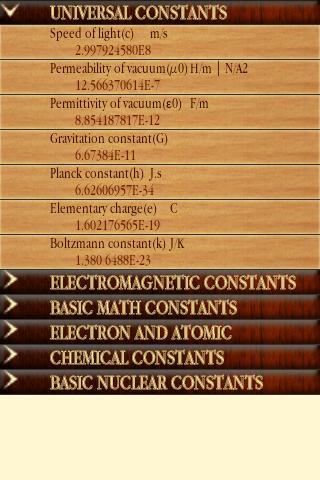
->50+ constants available
->Completely ad free
Note:This is my first android application.Please support me the maximum by downloading and please rate it :)
Special Features:
1.Expression evaluator:
With a dual screen display,user can easily type in algebraic expressions on the formula screen and get your answers on primary display by pressing =
Example:(2*sin(15))*(cos(65)-cbrt27)
2.Intelligent parenthesis:
This feature can speed up typing expressions by eliminating unnecessary usage of *(Multiplication).For instance instead of typing "(sin(45))*(cos(45)-tan(45))*25+56+98" you can type like this "(sin45)(cos45-tan45)25+56+98".This will considerably increase the typing speed.
3.Lot of shortcut usage of functions:
With this feature you can eliminate the unnecessary usage of parenthesis in functions.For example,You can do the expression "(sin(45))*(cos(45)-tan(45))*25+56+98" as "(sin45)(cos45-tan45)25+56+98".So simple and fast :)
4.Digital clock:
Calculex is equipped with an in-built digital clock using which you can keep track of time.For time limited math works,You can definitely utilize the power of this clock.Available in both Fullscreen/Normal modes.Can be turned off.
5.High precision input values:
User can input numbers with a maximum of 25 digits.So long,So good.
6.150+ conversion units
User can convert values into more than 150 units from various fields of science.
Get free Primogems, Mora, Experience, and more with these November 2024 Genshin Impact codes, 5.1 livestream codes, and find out how to redeem active codes.
If you are bored with playing the vanilla version of Metaphor ReFantazio, you can check out these five mods.
Struggling with your submissions for Roblox's The Haunt event in 2024? Check out our guide on using Dress to Impress to create your captures!
Our walkthrough for Dragon Age: The Veilguard with some handy tips and tricks, with guides for puzzles, bosses, companions, equipment, romance, and more!
Which faction should you pick in Dragon Age: The Veilguard?
Looking for some bonus resources in Sea of Conquest: Pirate War? We’ve got you covered with these codes for the latest seafaring freebies.
On our website, you can easily download the latest version of CalculeXLite Sci-Calculator! No registration and SMS required!